A Vendor DMZ Pattern

A long time ago, I was doing integration architecture work in the land of Enterprise Service Buses (ESBs) and API Gateways. Think IBM WebSphere DataPower and Apigee — I like to remember Apigee the way it was before it was integrated into GCP. After we had designed and built the ESB, we moved on to the API Gateway. In this context, the API Gateway would have two components (Internal Endpoints and External Endpoints). Eventually, we settled on the ESB being the Internal Endpoint and the “API Gateway” would be externally-facing. To some extent, these are just names given to overlapping concepts. At some point, it just becomes the modern-day equivalent of the medieval debate over how many angels can dance on the head of a pin.
One of the points of contention within the team as we developed the requirements was how external organizations (namely, suppliers, vendors, etc) would interact with these services from a network architecture perspective. The Integration Enterprise Architect viewed all of these business partners as trusted entities that should just have access to the internal network. This seems so wrong now, but at the time, I was having much difficulty constructing an argument that he could follow towards limiting access. In retrospect, I was simply talking to the wrong guy, who was making decisions where he didn’t understand the implications.
Vendor DMZ patterns are common in situations where:
- external contractors must maintain your IT systems
- your vendors, suppliers, business partners interact with your IT systems through B2B Integration Patterns.
- the same group has users that use applications hosted on your organization’s IT systems.
- Some type of database replication (high-bandwidth, no human interaction involved).
In fact, just about every organization I’ve ever walked into either had some form of this concept or was in great need of it.
A Vendor DMZ (Demilitarized Zone) is a network security architecture pattern used to allow third-party vendors to access internal systems while minimizing risk to the rest of the organization’s network. It isolates vendor connections in a controlled network segment rather than allowing them direct access to the internal network. It may be part of your regular DMZ at the edge of your network or it may be its own isolated island.
The idea is simple enough: treat vendors as semi-trusted external parties and strictly limit what they can interact with through TCP/IP layer firewalls, service endpoint authentication / authorization, and other standardized security capabilities that already exist on your internal network. These semi-trusted external parties may be connecting to you over the internet, over site-to-site VPN connections, or over leased (private) lines. For a large organization, one must plan for all three scenarios.
You may hear “leased lines” and “site-to-site VPNs” and chuckle to yourself thinking no one does that anymore. If your organization is young, probably true. If you are at a large, established company whose network architecture has been evolving for decades, there are probably still both of these in place. For especially sensitive data / tasks, this may very well make more sense then sending the data over the public internet (even with TLS and other precautions used). If your organization has multiple corporate campuses that require high-speed network connectivity, you are likely exploring similar solutions and security patterns — though, in some cases, there may be a higher-level of trusted allotted to the corporate campus (at least after proper authentication higher up the communication stack).
At one point, around 2015, I remember the talk of modern network security was that “everything is facing the edge, there is no concept of a DMZ anymore.” I never really bought into that. I never really stopped using the DMZ pattern.
Vendor DMZ Basic Concept
A Vendor DMZ is a segmented network area positioned between the internet, VPN tunnels, or private leased lines where a semi-trusted third-party (the vendor) enters your network where vendor access is terminated, inspected, & controlled and the internal corporate network meant to be protected.
Instead of the naive, risky approach (using a leased line or VPN connection, most likely):
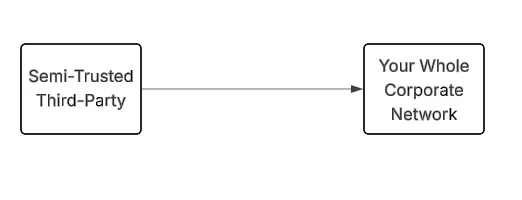
Complete Trusted Access To Your Network — Don’t Do This
You place a buffer between the Semi-Trusted Third-Party and internal systems on your trusted network.
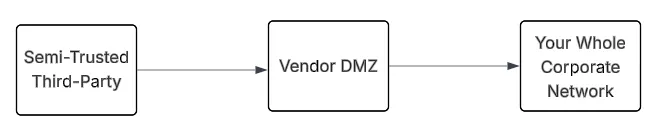
Third-Party (Vendor) Accessing Your Network Through a Vendor DMZ
The DMZ acts as a security buffer zone. It has a strong analogy to customer (or any other) traffic coming into a “regular” DMZ. In many cases, the Vendor DMZ will just be an isolated (set of) subnet(s) in your regular DMZ.
Notice, we are only discussing ingress / inbound-initiated traffic in a Vendor DMZ. Should egress-initiated traffic pass through the Vendor DMZ? That’s an interesting design question, but not one that I will attempt to address here. Outbound traffic to other vendor’s endpoints can pass through an existing API Gateway and out through a forward proxy or similar pattern that is already established. This doesn’t have to involve the Vendor DMZ. So, generally, the Vendor DMZ discussion is centered on vendor-initiated, inbound traffic.
Typical Vendor DMZ Architecture
A simplified vendor DMZ pattern may look like:
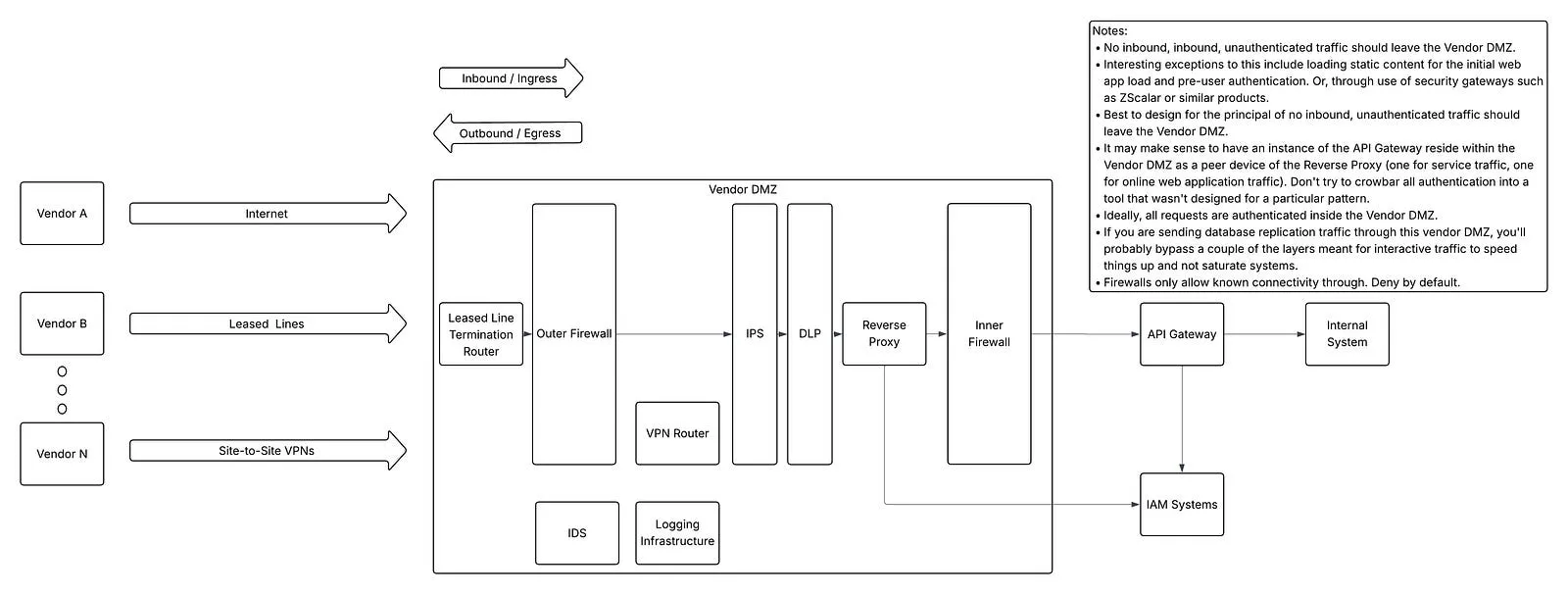
DMZ Architecture
Notice:
- Vendor traffic never directly reaches the internal network.
- No unauthenticated traffic enters the internal network.
- An inner and outer firewall deny all traffic by default.
- There is an Intrusion Prevention System (IPS) systems in place capable of blocking suspect traffic inline.
- If the IPS isn’t possible, use an IDS at least.
Additional notes:
- The exact ordering of these devices as traffic passes through may vary.
- Depending on your architecture, each of these boxes could be a virtual machine or a physical appliance.
- Data Loss Prevention (DLP) systems tend to be expensive and complex to manage (or even configure effectively).
- Plan for your internal network an DMZ network macro / micro segmentation.
- Any online (user-generated) traffic that passes through the Vendor DMZ must require Multi-Factor Authentication (MFA).
- If the Vendor DMZ provides remote terminal access (SSH / RDP / etc) to admins, all these same pieces should be in place for that access. Integration into a management network will need to be addressed (I’m not attempting to describe that in this post).
- The audit / logging capabilities that are deployed should record everything. Every click, every HTTP call, every keystroke, etc. Retain this data per corporate data retention policies. If responses contain sensitive data, the response data captures may need to be filtered per corporate policies (legal requirements, etc).
- Separate production and non-production system access. This implies that there should be a separate production and non-production Vendor DMZ. Ideally, this would be separate hardware, separate network, separate identity stack, separate everything.
- HIPAA / HITRUST and similar regulations require that sensitive data in motion be passed over encrypted links. This is often taken to mean the use of TLS v1.2 or better (or whatever the current version is), but if you are using leads lines or VPN connections, these technologies can provide strong encryption further down the communication stack than TLS. However, these technologies only cover part of the full network journey. Even if the physical layer of the network offers strong encryption over part of the network path, use TLS or message-level encryption anyway to ensure data in flight remains confidential across the entire network path.
- Even if you are using leased lines, that dedicated physical line usually only goes from your data center to the closest, regional office for the ISP. From there, it is likely going to join a common network path to get to the next hop…and the hop after that. Even if there is an encryption layer (physical, VPN, etc) that is provided, is it really end-to-end? Go ahead and use TLS (or equivalent) anyway that is fully under your control.
- The phrase “trusted network” should not be used during any part of this conversation.
- I’ve always preferred security solutions that come as VM images or turn-key appliances rather starting with base OS installs and configuring security services from scratch (and then having to harden the underlying OS + HyperVisors, etc) in your DMZ. If you are thinking that this excludes OpenSource Software (OSS), checkout pfSense Community Edition, which supports several different hardware forms. This can handle VPN Router, IPS / IDS, IP firewall, and various monitoring capabilities. There are other OSS tools in this space as well with a similar form factor.
- I’ve also always tried to avoid deploying complex middleware /integration technologies (WebSphereMQ is my classic example) in DMZs. The DMZ should be relatively simple. I’ve been in many shops that did this anyway. Properly securing complex middleware in a DMZ is its own topic and I’m not going to attempt to cover that here either.
- You will need some type of secure secrets storage capability in your vendor DMZ. There could be a locally deployed agent that connects to and caches secrets from your internal solution. Or, you could run a separate service within the Vendor DMZ. I’ve seen both done.
- If you are using a cloud-hosted CDN, WAF, and / or DDoS Prevention Service with your applications that are otherwise facing the internet and wondering how to make all that work with your Vendor DMZ, the answer is probably that you will not. Maybe static content can be accessed through the CDN, but that is going to be out-of-band with the rest of the application traffic and messy to troubleshoot if it breaks. If you include these services in your Vendor DMZ, it would be best that they be self-contained within the Vendor DMZ. I discuss this briefly in “Internal Endpoints Must Have The Same Security Capabilities As External Endpoints”
I was at one client site several years ago where most of these concepts were in place, but then we learned, long after the initial deployment, that the routers where leased lines terminated (owned by the ISP) had cellular chips / antennas that allowed remote access for administration. That was missed in the initial threat modeling. I can only say, ask lots of questions and legal contracts should stipulate that vendors must go through the company’s standard remote access mechanisms to access such devices (even if they own those devices). A phone-home / connect-to-the-mothership management pattern from the onprem device owned by the company to some type of centralized access service may be acceptable, but ensure that those outbound connections go through a forward (egress) proxy that can authenticate / log the connections.
Your Vendor DMZ architecture will be a balance between capabilities, risk, and cost.
Vendor DMZ Components
Vendor VPN Gateway
Connecting vendors to your network through site-to-site VPN connections is quite common. Typical features include:
- Authentication (including MFA)
- IP restrictions (this is becoming less common, don’t use this as the sole means of authentication)
- certificate-based authentication
- Encryption / Confidentiality (at least over the VPN tunnel network hop)
There are several VPN protocols: IPSec, OpenVPN, WireGauard, etc. In the enterprise space, IPSec VPN is typically used; it’s also quite complex to configure and troubleshoot. Personally, I’ve used OpenVPN for site-to-site VPN connections and it has satisfied my needs, but that has always been for smaller deployments.
Vendor DMZ Network Segment
This network segment isolates vendor activity
Characteristics:
- Separate VLAN(s) or subnet(s)
- Strict firewall rules (deny by default, only allowed to connect into the DMZ security service endpoint where traffic intentionally flows first: DLP / IPS / etc).
- Heavy monitoring and logging.
- Physically separate hardware from the internal network
You may have separate subnets representing what is safe to connect into the internal network (through the internal firewall) and what is “not safe” and represents traffic coming in from the outside. There are different patterns utilized in this space. I’m not attempting to cover those patterns here.
Network architects / engineers also tend to use subnets that are as small as possible in DMZs and other sensitive network spaces to prevent rogue devices / actors from ever having the opportunity to join / connect to the network because there are no available IP addresses. So far, I’ve seen this mean that:
- any future expansion requires reIPing the entire DMZ network.
- all attempts to troubleshoot that would require adding another device (or a laptop with a network sniffer) is impossible without reIPing the entire network.
Maybe leave some available expansion in the IP space, but leave firewall rules in place blocking that for the time being. Or, something else that doesn’t require 100s of hours of work to do the most basic tasks.
On another occasion, I saw a large client’s network team take the enterprise architecture edict regarding “everything will be virtualized going forward” to mean that that they could save on hardware costs and assume nothing physical would ever be plugged into their DMZ. Of course, there wasn’t even room (network switch port) to install server hardware that could host VMs for services.
Outer Firewall
A typical Vendor DMZ architecture will include two firewalls: Outer Firewall & Inner Firewall.
The Outer Firewall will have relatively coarse grained, simple rules that blocks everything by default and allows the incoming connections from known vendors. Connectivity is only allowed into the first layer of security services (VPN Router, DLP service, IPS, etc).
Internal Firewall
This second firewall layer enforces very granular rules. Generally, this will allow access to only the application endpoints that are required on the internal network. A distinct firewall vendor should be used at this layer from the outer firewall layer.
Monitoring and Logging
Vendor activity must be monitored more heavily than internal users. This likely means that all
Controls may include:
- session recording
- command auditing
- SIEM integration
- anomaly detection
Logs from your DMZ should flow into a central logging services that is used by the whole organization. From there, logs that are of interest for security should be picked up by your organization’s Security Information & Event Management (SIEM).
Monitoring infrastructure should also be deployed to your Vendor DMZ. There are many products that can do this.
Reverse Proxy (Security Gateway)
For traffic involving human users, a security gateway that handles authentication and a Coarse-Grained Authorization (CGA) decision within the DMZ is ideal. Again, zScalar or a product like it can handle this nicely. This security gateway will need to be able to integrate with your IAM stack to provide / preserve the SSO experience.
The catch here is that your applications have to be able to seamlessly and securely integrate with the information that the security gateway passes to it. Otherwise, you will end up with a situation where each application will prompt the user to authenticate again. Or, even better (sarcasm), if you didn’t have SSO to begin with and don’t bother handling the identity integration details, you’ll log into the security gateway with one set of credentials and log in a second time to the application on the backend with a different set of credentials. This an utter failure of IT Governance, Architecture, and IAM.
Some popular security gateway products of this nature have a cloud-hosted management plan and a simple agent that runs on a VM in your DMZ that dials-the-mother-ship and maintains an open connection. For my DMZ (Vendor or otherwise) security architecture, I would very much prefer it to be self-contained and under the owning organization’s control.
API Gateway
For services / API — stateless, synchronous request-response Message Exchange Pattern style communication — an API Gateway is typically used to handle edge security concerns. I like to think of API Gateways and the previous application security gateway as peer technologies. The outer firewall will forward traffic to one or the other based upon the use case. Then, let each of these technologies do what it is best at doing.
The moment you try to ramrod all the services traffic through the assumed-human-facing security gateway or web application traffic through the API Gateway, things start getting very messy.
Identity Stack
This is your Identity and Access Management (IAM) stack. How this functionality is exposed through your Vendor DMZ is part of a wider identity discussion your organization needs to have. The Security Gateway and API Gateways mentioned above could potentially wrap the functionality and address how it is presented to your semi-trusted third-parties. You could have some type of dedicated proxy (with load balancer) in your DMZ that handles the details (Microsoft AD FS does this). You could expose your Identity Provider through your Vendor DMZ infrastructure the same way as any other internally-hosted service.
Learn about authentication.
Learn about authorization.
Check out the rest of my posts for a lot of discussion regarding identity.
Data Loss Prevention
Data Loss Prevention (DLP) technologies are designed to detect, monitor, and prevent the unauthorized exposure, transfer, or misuse of sensitive data. They sit at the intersection of security, compliance, and data governance, helping organizations control how data is used across endpoints, networks, and cloud environments. At its core, DLP answers:
- What sensitive data do we have?
- Where is it going?
- Should that be allowed?
DLP systems enforce policies to ensure that sensitive data — like personal information, financial records, or intellectual property — doesn’t leave controlled environments improperly.
DLP tools typically focus on structured and unstructured sensitive data, such as:
- Personally identifiable information (PII)
- Financial data (credit cards, bank accounts)
- Health records (regulated under Health Insurance Portability and Accountability Act)
- Intellectual property (source code, designs)
- Credentials and secrets
Many organizations align DLP policies with regulations like the General Data Protection Regulation (GDPR)
There are several deployment models (often different agents that are part of a wider product suite):
- Email scanner (scans outgoing email messages and attachments for sensitive data)
- Web proxy (reverse proxy that scans the responses to web requests initiated from outside the organization or a reverse proxy; forward proxy that handles requests initiated from within your organization that is looking at the content of requests).
- Database access (a DLP agent running on each database server, typically specific to the database vendor, that is analyzing the response to every query)
- Cloud scanner (scan cloud drives, cloud email systems, cloud filesystems for VMs, integrate with PaaS database services, etc).
Data is detected through a combination of exact data matching, machine learning (based on document type, content patterns, and user behavior) and regular expression pattern matching. The potential for floods of false positives that no human could possibly keep up with is great. Achieving and maintaining a correct configuration that balances risk with managability (and commonsense) is a journey, not a destination.
For our Vendor DMZ purposes, where we are concerned with ingress traffic, you will want to have the reverse web proxy agent deployed as part of your Vendor DMZ Architecture that is looking at the content of responses your organization is sending to the vendor.
IDS / IPS
Intrusion Detection Systems (IDS) and Intrusion Prevention Systems (IPS) are network (and sometimes host-based) security technologies that monitor activity for malicious behavior — with IDS focusing on detection and alerting, and IPS adding real-time blocking. The basic difference between the two is:
IDS = “Something looks wrong → tell me”
IPS = “Something looks wrong → stop it”
Both analyze traffic and system activity to identify:
- Attacks
- Policy violations
- Suspicious behavior
Depending on the product architecture, these can be host-based or network-based. The network-based products are typically some-type of stand-alone appliance (or VM) that needs to have access to the network being analyzed. An IPS will need to be inline (most effectively in a layer-2 “bump-in-the-wire-bridge” inline mode to avoid complex network configurations — this avoids any routing or IP address changes a the IP layer. Then, the IPS can still block traffic, but not add complexity to the network configuration. An IDS does not have to be inline, it just needs access to the traffic.
There is also the question of how an IDS / IPS works if all the traffic that is supposed to be analyzed is encrypted. In this case, the agents will have to be installed at the source prior to the data being passed down the encrypted channel. In this case, a host-based IDS / IPS is being used.
Security Benefits
A Vendor DMZ provides the following security benefits / capabilities:
- Isolation
- Reduced Lateral Movement
- Controlled Access
- Auditing / Logging
- Monitoring
- A building block of a Zero Trust Architecture
- A building block of Privileged Access Management (PAM)
- Network segmentation
These semi-trusted third-parties are only given access to network endpoints that are actually needed. Each of these network endpoints (applications, services) have authentication, authorization, and other service capabilities built in already that are in effect.
Summary
A Vendor DMZ is a network security architecture that isolates third-party vendor access into a controlled network zone, ensuring vendors can access only the specific systems they need while protecting the broader internal network. Most of the patterns and capabilities discussed here are the same one would find in a regular DMZ.
In a future blog post, we can talk about egress traffic patterns for when your organization is calling vendor-hosted services.
Notes:
- AI / GenAI / ChatGPT / etc were not used to generate this article.
- I used em dashes in my writing before the current GenAI wave was a thing. Not planning on changing now..
- Names have been changed to protect the guilty.
- None of the hostname or users used in examples actually exist.
- Feel free to post any comments or suggestions below.
Originally published on Medium.