Data Loss Prevention (DLP): Keeping Your Organization’s Secrets from Walking Out the Door
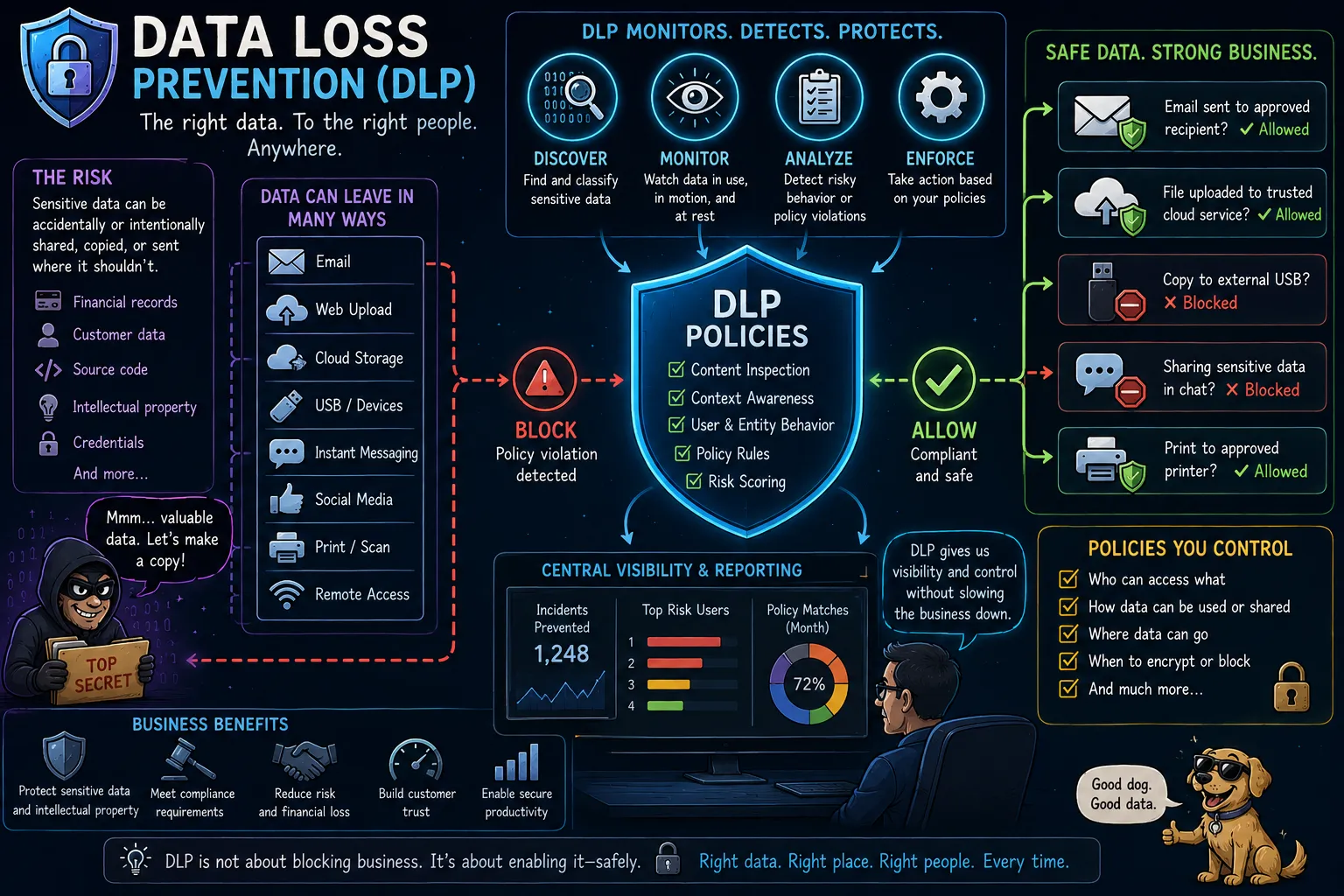
For decades, organizations have focused on keeping attackers out. Firewalls, antivirus software, intrusion detection systems, IAM solutions, and the like all serve a common purpose to prevent unauthorized access. However, many security incidents do not begin with an external attacker breaking in. Sometimes, the problem is that sensitive information is already inside the organization and leaves through legitimate channels.
This is where Data Loss Prevention (DLP) comes into play.
One usually sees this deployed in organizations operating within heavily regulated industries that deal with data protected by various regulations (HIPAA, PCI, GDPR, etc) or an organization with significant intellectual property that must remain within the controlled-domain of the organization.
What is Data Loss Prevention?
Data Loss Prevention is a collection of technologies, policies, and processes designed to identify, monitor, and prevent the unauthorized disclosure of sensitive information.
A DLP solution attempts to answer three important questions:
- What sensitive data do we have?
- Where is that data located?
- How do we prevent it from leaving authorized environments?
Common use cases for DLP include:
Insider Threats: A departing employee copies customer records before resigning. DLP can:
- Detect unusual behavior
- Block transfers
- Alert security teams
Regulatory Compliance: Supports compliance efforts for:
- GDPR
- HIPAA
- PCI DSS
- Various privacy regulations
Intellectual Property Protection:
- Source code
- Engineering drawings
- Research data
- Strategic plans
- Other proprietary assets
Sensitive information that is being protected may include:
- Personally Identifiable Information (PII)
- Social Security numbers (other country’s national ID number)
- Driver’s license numbers
- Passport numbers
- Financial data
- Credit card numbers
- Bank account information
- Healthcare information
- Patient records
- Insurance data
- Intellectual property
- Source code
- Product designs
- Trade secrets
- Business data
- Contracts
- Customer lists
- Financial forecasts
That list looks much like the lists of important data I’ve created for other posts in my Privacy Series.
The goal of DLP is not simply to detect data. It is to ensure that data remains under organizational control. That organizational control also brings us to the dark side of Bring Your Own Device (BYOD) policies. Sounds great in practice, but potentially comes at the expense of employee privacy. So, maybe, you want to have a separate device for the work-related stuff.
The Need for a DLP Capability
Organizations create and process enormous volumes of information every day. Employees share files through email, cloud storage platforms, collaboration tools, messaging applications, and removable media.
Without visibility into these data flows, sensitive information can leave the organization intentionally or accidentally.
Common examples include:
- An employee emailing a customer database to a personal email account
- A developer uploading proprietary source code to a public repository or to their favorite AI coding agent.
- A user copying confidential files to a USB drive
- A cloud storage bucket containing sensitive information being shared publicly
- An AI application exposing internal documents through an improperly configured prompt or retrieval system
Not every incident involves malicious intent. In fact, many data exposures occur because users simply do not understand the sensitivity of the information they are handling or the lack of security / privacy controls of the third-party system they’ve sent / shared data too / with. This ties into the Shadow IT phenomenon and end users just not comprehending the difference in security controls between systems maintained by their internal IT department and the free functionality some third-party is offering. Many of those free applications on the internet specifically state that they will share data, use it to their advantage, that their platform is not HIPAA / PCI-DSS compliant, etc, etc. Now, many of these organizations do make an honest attempt to implement basic controls security controls and are stating those controls aren’t sufficient to satisfy various regulatory requirements — let’s give credit where credit is due. However, the notion that you as an employee or contractor would take your employer’s / client’s data, send it to a website / tool / app that has no formal / contractual relationship with that organization, not bother understanding the most basic terms of service, and then be surprised that this is an issue is laughable on the best of days.
Types of DLP Solutions
Endpoint DLP
Endpoint DLP focuses on laptops, desktops, and servers.
These solutions monitor activities such as:
- Copying files to USB devices
- Printing documents
- Uploading files to websites
- Copying data to clipboard applications
- Sharing files through cloud storage platforms
Endpoint DLP provides visibility into user behavior and can prevent risky actions before data leaves the device.
These typically appear as an agent that runs as a Windows Service on a user’s device or daemon on a server that monitors I/O activity. These days, the agents typically connect to some type of cloud-hosted management plane (dialing home to the mother ship as I like to say).
Network DLP
Network DLP monitors data moving across the network.
Examples include:
- Email traffic
- File transfers
- Web uploads
- Instant messaging
- Application traffic
Network DLP can inspect data in transit and identify sensitive content before it leaves the organization.
This is usually implemented as a forward (or egress) proxy at the edge of a network or DMZ that all traffic exiting the network is forced to flow through. For a large organization, that’s been around for a while, there may be a chain of egress proxies that are configured in a parent-child relationship. Various systems / devices on the corporate network (data center network) will be configured to have the top-level (parent) proxy configured as the proxy traffic must pass through to exit the environment to an endpoint on the internet.
There may be separate modules for specialized systems like email. The implementation details can vary widely by vendor.
Cloud DLP
As organizations move data into cloud environments, cloud-focused DLP solutions have become increasingly important.
Cloud DLP tools can monitor:
- SaaS platforms
- Cloud storage services
- Collaboration tools
- Cloud databases
- AI and machine learning services
These tools help organizations maintain visibility even when data resides outside traditional corporate networks.
The Cloud DLP solution itself will usually be some type of SaaS solution deployed on the same cloud platform that has been granted special access to your organization’s tenant on that cloud-hosting provider.
Again, there will most likely be some type of communication back to a centralized management plane that may not be on the same cloud-hosting provider.
The major public cloud hosting platforms each have their own DLP solutions or pieces of one:
- AWS (not a complete solution, but provides pieces of one)
- GCP
- Azure (MS Purview) — supports parts of it, but doesn’t really claim to be a complete solution.
How DLP Identifies Sensitive Data
DLP systems use a variety of detection techniques.
Pattern Matching
The simplest method looks for recognizable patterns such as:
- Credit card numbers
- Social Security numbers
- Passport numbers
- Tax identification numbers
For example, a DLP system might identify a file containing hundreds of valid credit card numbers and flag it as sensitive.
At the same time, the chances of false positives occurring with pattern matching is fairly high. If every nine digit sequence of numbers is treated as a Social Security Number and every sixteen digit number sequence is assumed to be a credit card number, the potential for annoying, meaningless alerts is high. I’ve been in an organizations that literally banned using nine / sixteen digit number sequences in documents to avoid these problems — note, this policy is a very stupid solution to an annoying problem.
Keyword and Dictionary Matching
Organizations can define keywords associated with confidential projects, internal products, or regulated information.
Examples include:
- Internal project names
- Product codenames
- Merger and acquisition terminology
- Confidential business identifiers
Fingerprinting and Exact Data Matching
Advanced DLP systems can create fingerprints of known sensitive documents and databases.
This allows them to identify copies, excerpts, or modified versions of protected content.
Machine Learning and Contextual Analysis
Modern DLP solutions increasingly use machine learning to understand context.
Instead of simply identifying patterns, these systems attempt to determine:
- What type of document is being handled
- Whether the content is likely sensitive
- Whether the action being performed is unusual
Fingerprinting
Creates hashes or signatures of documents.
Useful for:
- Source code
- Contracts
- Proprietary documents
DLP and Artificial Intelligence
The rise of generative AI has introduced new challenges for data protection.
Employees may unknowingly paste sensitive information into AI systems for summarization, analysis, or content generation.
Examples include:
- Source code
- Customer records
- Internal financial reports
- Strategic planning documents
- Proprietary intellectual property
Organizations are increasingly extending DLP controls to AI platforms to prevent sensitive data from being exposed through prompts, training data, or retrieval systems.
In many environments, DLP has become a critical control for managing AI-related risks.
Common Challenges and Limitations
Despite its value, DLP is not a magic solution. DLP is often viewed as one of the more difficult enterprise security technologies to deploy effectively.
Organizations often struggle with:
- False Positives: An overly aggressive DLP policy can generate large numbers of alerts, overwhelming security teams and frustrating users.
- User Friction: If controls are too restrictive, employees may attempt to bypass them using unauthorized tools and services.
- Data Classification: DLP is only as effective as an organization’s understanding of its data. Many organizations discover they have significant gaps in their data inventory and classification processes. Poor classification leads to missed leaks and excessive alerts
- Encryption and Shadow IT: DLP can struggle when users encrypt files independently, use unauthorized cloud services, or transfer data through unmanaged devices
- Cloud and Hybrid Environments: Modern data often exists across multiple platforms, making comprehensive visibility difficult.
- Data Egress Paths You Don’t Control: If there is a data egress path that you don’t control due to politics, contractual agreements, history, your DLP solution may not be effective there. Try to place a DLP control point as close to the egress point as possible where you can legally, politically, technically deploy one.
Best Practices
Organizations implementing DLP should:
- Classify sensitive data before deploying controls.
- Understand the egress / exit points from your organization’s network / sphere-of-control.
- Start with monitoring and visibility before blocking actions.
- Focus on high-risk data first.
- Continuously tune policies to reduce false positives.
- Integrate DLP with incident response workflows.
- Extend DLP coverage to cloud and AI platforms.
- Educate employees about data handling responsibilities.
Major DLP Vendors
Some well-known enterprise DLP offerings include:
Practical DLP
A common misconception is that DLP primarily stops external hackers. In practice, DLP is often more focused on controlling how legitimate users handle sensitive information.
A mature DLP program typically combines:
- Data discovery and classification
- Endpoint controls
- Network monitoring
- Cloud monitoring
- User education
- Incident response procedures
The technology itself is only one piece; organizations that succeed with DLP usually invest heavily in data classification, governance, and business process alignment.
Conclusion
Data Loss Prevention is about maintaining control over sensitive information. While traditional cybersecurity focuses on preventing unauthorized access, DLP focuses on preventing unauthorized disclosure.
As organizations continue adopting cloud services, remote work, and AI-powered applications, understanding where sensitive information resides and how it moves has become more important than ever.
A well-designed DLP program provides the visibility, controls, and governance necessary to ensure that an organization’s most valuable data remains protected, regardless of where it travels.
Notes
- AI / GenAI / ChatGPT / etc were not used to generate the text of this article.
- ChatGPT was used to generate the images.
- I used em dashes in my writing before the current GenAI wave was a thing. Not planning on changing now.
- Names have been changed to protect the guilty.
- None of the hostnames or users used in examples actually exist.
- Feel free to post any comments or suggestions below.
Originally published on Medium.